Infos about this website
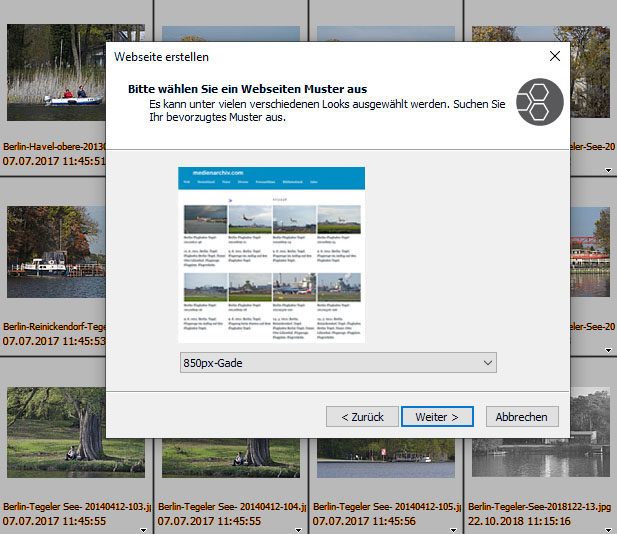
Web assistant of FotoStation
The HTML pages of medienarchiv.com were created using Dreamweaver and are linked via a single template. This is a design template with header and footer that contains tables of contents and links. When a template is changed, all pages created with it are automatically updated.
On fiverr.com, a programmer in Bangladesh was found who made the template responsive and supplied the necessary additional files. The transformation of the rigid HTML pages into responsive ones took about three weeks, with numerous individual adjustments for different page types accumulated over several years. Without Dreamweaver’s excellent search-and-replace function, this would not have been possible. Approximately 45,000 HTML pages were modernized in this way.
HTML pages are robust, but they lack dynamic search functions, which only databases can provide in a satisfactory way. Therefore, HTML albums only make sense with clearly structured indexes and thematic categorization.
In addition to HTML pages, I have been testing various image databases since 2010. They are based on so-called MySQL databases and require the installation of a program on the web host’s server. The MySQL database is a critical factor. If it becomes damaged or is lost and no reasonably up-to-date backup exists, the online presence may be irreparably broken. Individual customizations of the image database can be lost during updates, yet updates are unavoidable for security reasons. Until 2013, the costs of hosting fast and extensive image databases were relatively high. In 2014, there was a significant price reduction accompanied by the introduction of better technology.
Updates to image databases and hosting environments are problematic. Unlike simple HTML pages, there is unfortunately no “set it and forget it” solution with such systems. A certain level of attention and occasional adjustments are always necessary when using image databases. Of the various image databases I tested, three proved to be recommendable: Coppermine Photo Gallery, Pixtacy, and WPPA+ (a WordPress plugin).
To minimize risks related to data protection regulations, registration and participation by other users are disabled. Users therefore cannot rate images and can only comment in exceptional cases. I sometimes use the comment function to involve knowledgeable users in image captioning, for example when identifying plants. Registration is not required for this. No personal data is collected. Coppermine is free of charge.
WPPA+ is very well suited for combining a photo archive with articles. I use it for smaller projects. See this example:
berlinpotsdamerplatz.de
However, Pixtacy was developed for large screens and, to this day (May 2019), is not truly compatible with the requirements of mobile-friendly design. Creating a reasonably acceptable individual design that looks good on both large monitors and smartphones is only reliably possible for users with very strong programming skills. I tried several times and eventually gave up. I have not tested version 5 (released in 2020).
From a data protection perspective, databases involve risks that hardly occur with HTML. For the operator of an image database, even with careful configuration, it cannot be completely ruled out that visitors may cause issues that were assumed to be prevented by the chosen settings.
A website entirely based on HTML can be stored on a data medium and used offline. HTML is easy to design. In addition, a website with many HTML pages has SEO advantages.
Much speaks in favor of thematically structured, conventional HTML pages organized via thesaurus-like tables of contents. However, it is not possible to integrate an internal search engine that dynamically generates result tables. On the other hand, images do not get lost even if they are incompletely or incorrectly captioned. Databases also offer the possibility of integrating sales tools. Anyone with such ambitions cannot avoid using a database.
For closed collections, such as photographic estates, I consider HTML pages to be better, whereas databases are more suitable for topics where new photos are constantly being added and older image material is sometimes discarded.

Image Database or Albums based on HTML Pages?
© Thomas Gade| Page | 1 Online Photo Archive |
| 2 Conventional HTML pages or dynamic image databases? | |
| 3 Photographic estates and my own photographs |
Technical background
In the early days (late 1990s), photo albums for the Internet were mainly created using static HTML pages. Some image management programs already included good assistants for this purpose by the end of the 1990s. FotoStation, starting with version 4 (released in 2000), has been particularly convenient and, even today (June 2020 / version 8), is still very well suited for this task because its web templates (design and functionality templates) are easy to edit. This is unique.
Web assistant of FotoStation
Mobile-Friendly Content
Around 2015, pressure increased to program websites in a mobile-friendly way so that they would look proper on both large monitors and the small displays of smartphones and tablets. At first, this seemed to herald the end of traditional HTML pages.The HTML pages of medienarchiv.com were created using Dreamweaver and are linked via a single template. This is a design template with header and footer that contains tables of contents and links. When a template is changed, all pages created with it are automatically updated.
On fiverr.com, a programmer in Bangladesh was found who made the template responsive and supplied the necessary additional files. The transformation of the rigid HTML pages into responsive ones took about three weeks, with numerous individual adjustments for different page types accumulated over several years. Without Dreamweaver’s excellent search-and-replace function, this would not have been possible. Approximately 45,000 HTML pages were modernized in this way.
HTML pages are robust, but they lack dynamic search functions, which only databases can provide in a satisfactory way. Therefore, HTML albums only make sense with clearly structured indexes and thematic categorization.
Databases
In the 1990s, image databases with search functions were found almost exclusively in publishing houses, image agencies, and large archives. Only a few people had the motivation and specialized skills to develop their own solutions. From 2003 onwards, however, various royalty-free image database programs were released on the web and further developed by computer scientists worldwide. One of these is Coppermine Photo Gallery (released in 2003), which is still available for free and continues to be updated.In addition to HTML pages, I have been testing various image databases since 2010. They are based on so-called MySQL databases and require the installation of a program on the web host’s server. The MySQL database is a critical factor. If it becomes damaged or is lost and no reasonably up-to-date backup exists, the online presence may be irreparably broken. Individual customizations of the image database can be lost during updates, yet updates are unavoidable for security reasons. Until 2013, the costs of hosting fast and extensive image databases were relatively high. In 2014, there was a significant price reduction accompanied by the introduction of better technology.
Updates to image databases and hosting environments are problematic. Unlike simple HTML pages, there is unfortunately no “set it and forget it” solution with such systems. A certain level of attention and occasional adjustments are always necessary when using image databases. Of the various image databases I tested, three proved to be recommendable: Coppermine Photo Gallery, Pixtacy, and WPPA+ (a WordPress plugin).
Coppermine Photo Gallery
Currently, medienarchiv.com contains, in addition to its many HTML pages, an additional Coppermine Photo Gallery.To minimize risks related to data protection regulations, registration and participation by other users are disabled. Users therefore cannot rate images and can only comment in exceptional cases. I sometimes use the comment function to involve knowledgeable users in image captioning, for example when identifying plants. Registration is not required for this. No personal data is collected. Coppermine is free of charge.
WPPA+ (for WordPress)
An alternative to Coppermine is “WP Photo Album Plus” (WPPA+). Its Dutch creator, Jaap Breetvelt, originally an organ builder, does excellent work. Since 2019, both the range of functions and the configurability, as well as the design possibilities, have been at a high level. Particularly attractive is the fact that WPPA+ is embedded in WordPress, for which many design templates (themes) and numerous plugins exist that greatly extend functionality. In any case, WPPA+ has a significantly better relationship with search engines than Coppermine. It is also advantageous that WordPress can be used alongside the photo archive to publish articles about photo series. The sustainability of such an installation is unclear, as many plugins and WordPress itself are updated at relatively short intervals, which can lead to incompatibilities. From today’s perspective (2019), I would recommend WPPA+ as the best compromise among the three mentioned databases. WPPA+ and WordPress are free.WPPA+ is very well suited for combining a photo archive with articles. I use it for smaller projects. See this example:
berlinpotsdamerplatz.de
Pixtacy
In 2009, the idea of running my own image shop on the Internet was still on the table for me. At that time, the software Pixtacy was released. It comes from a programmer in Bremen, is commercial software, and is very well designed in terms of handling photos. In addition, it offers sales tools that are largely compatible with commercial rights in Germany. However, due to the legal framework and the required maintenance effort, the investment only pays off once a sustainable level of revenue is reached, most likely by wedding or school photographers. They can use Pixtacy to market photos from events. Through integration with service providers, Pixtacy can largely automate the creation of photo products, related logistics, and payment processing. Pixtacy provides the best tools for setting up a DIY image shop.However, Pixtacy was developed for large screens and, to this day (May 2019), is not truly compatible with the requirements of mobile-friendly design. Creating a reasonably acceptable individual design that looks good on both large monitors and smartphones is only reliably possible for users with very strong programming skills. I tried several times and eventually gave up. I have not tested version 5 (released in 2020).
HTML Pages or Image Database?
HTML pages are sustainable and robust. Once you have learned how to create them, returning to them even after a longer break is unproblematic. The same cannot be said for image databases. Updates are required on an ongoing basis. Complex configuration processes are quickly forgotten and require renewed familiarization when needed again.From a data protection perspective, databases involve risks that hardly occur with HTML. For the operator of an image database, even with careful configuration, it cannot be completely ruled out that visitors may cause issues that were assumed to be prevented by the chosen settings.
A website entirely based on HTML can be stored on a data medium and used offline. HTML is easy to design. In addition, a website with many HTML pages has SEO advantages.
Much speaks in favor of thematically structured, conventional HTML pages organized via thesaurus-like tables of contents. However, it is not possible to integrate an internal search engine that dynamically generates result tables. On the other hand, images do not get lost even if they are incompletely or incorrectly captioned. Databases also offer the possibility of integrating sales tools. Anyone with such ambitions cannot avoid using a database.
For closed collections, such as photographic estates, I consider HTML pages to be better, whereas databases are more suitable for topics where new photos are constantly being added and older image material is sometimes discarded.
| Page | 1 Online Photo Archive |
| 2 Conventional HTML pages or dynamic image databases? | |
| 3 Photographic estates and my own photographs |
The content on this website was originally written in German. Only later were longer articles
translated into English to reach a more global audience. Hopefully, the supporting AI didn’t
introduce too many errors in the process. For pages that primarily showcase images, however,
the additional effort of creating duplicate versions in two languages is hardly worthwhile.